
Microsoft Launcher and Samsung One UI both change the look and feel of your Android phone, but they are built for different priorities. One focuses on Microsoft services and productivity, while the other is designed around Samsung phones and a more integrated Android experience.
If you are trying to decide which launcher is better for you, the right choice depends on how you use your phone every day, what apps and services you rely on, and whether you prefer simplicity, customization, or tighter hardware integration.
What Each Launcher Is Designed to Do
A launcher is the part of Android that controls your home screen, app drawer, widgets, and often some of the visual style and shortcuts you use most. It does not replace Android itself, but it can change your daily experience in noticeable ways.
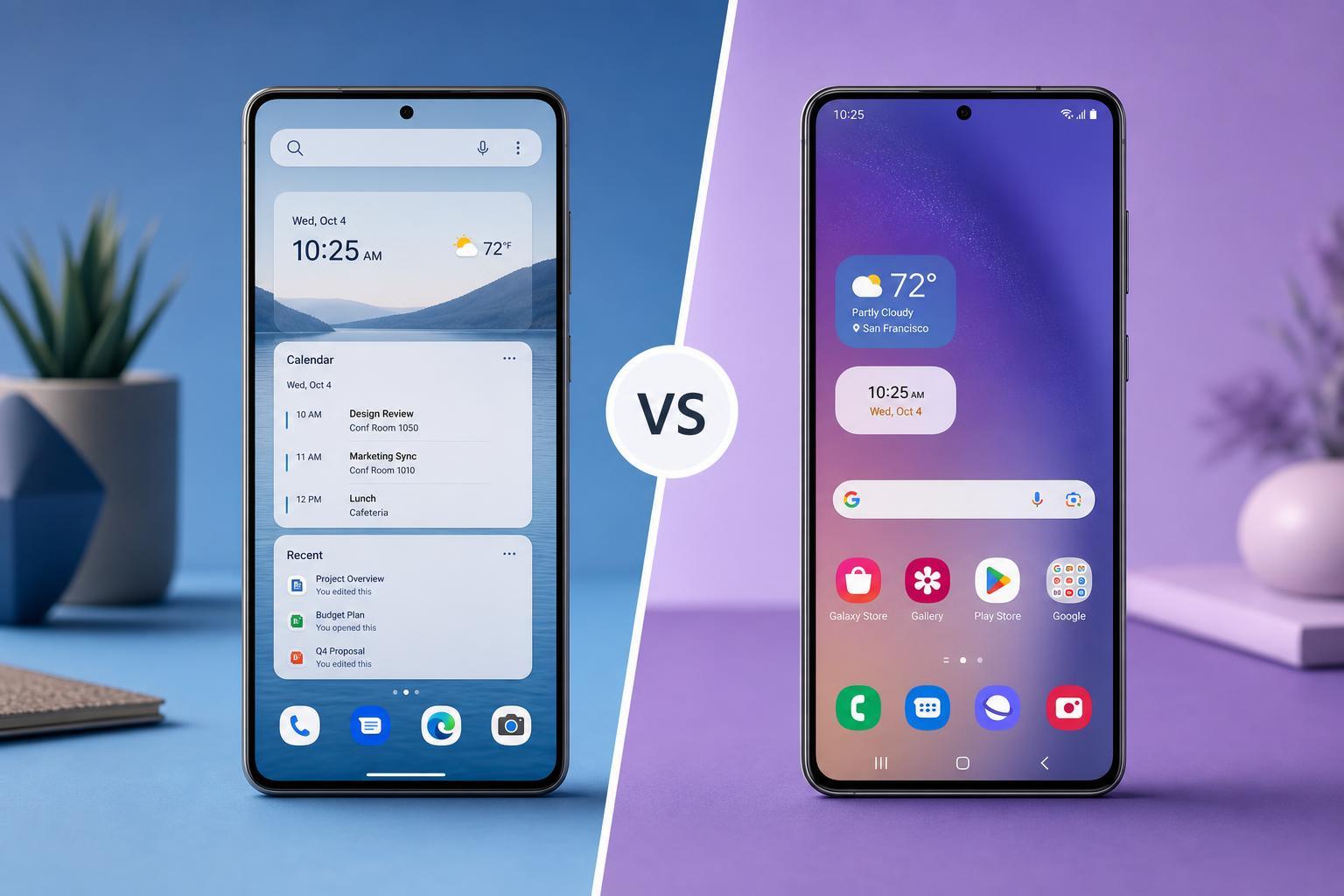
Microsoft Launcher is made for people who use Microsoft services such as Outlook, OneDrive, To Do, and Microsoft 365. It emphasizes feed-based productivity, cross-device continuity, and quick access to your calendar, documents, and tasks.
Samsung One UI is not a separate third-party launcher in the same way. It is Samsung’s own Android interface and home screen experience, built specifically for Galaxy devices. It is designed to work closely with Samsung hardware, Samsung apps, and One UI system features.
Main Differences at a Glance
- Microsoft Launcher is best known for productivity tools, the personalized feed, and Microsoft account integration.
- Samsung One UI is better for deep integration with Galaxy phones, Samsung features, and a polished system-wide experience.
- Microsoft Launcher is more useful if you live in Outlook, OneDrive, and Microsoft 365.
- Samsung One UI is usually the better choice if you want the most seamless experience on a Samsung phone.
- Microsoft Launcher can be used on a wide range of Android devices, while Samsung One UI is built into Samsung’s software layer.
Home Screen and Everyday Use
Microsoft Launcher gives you a clean home screen with strong organization features. You can add widgets, organize apps into folders, and access a feed that can show calendar events, tasks, news, and recent activity. That makes it appealing if you want your phone to feel like a mobile workspace.
Samsung One UI focuses more on a traditional Android home screen with Samsung’s own styling and convenience features. It feels familiar, polished, and well integrated with the rest of the phone. If you want a balanced experience without making the home screen feel overly business-focused, One UI is often easier to live with.
Customization Options
Microsoft Launcher offers strong customization for wallpapers, icon layouts, gestures, app folders, and the overall appearance of the home screen. It is flexible without becoming too complicated, which is helpful if you want a launcher that can be tuned to your workflow.
Samsung One UI also offers plenty of customization, especially when used with Samsung tools like Good Lock. You can adjust the home screen grid, icon packs, themes, edge panels, and many interface details. On a Samsung device, this can go far beyond what many people expect from a stock-style Android experience.
Productivity and Cross-Device Features
This is where Microsoft Launcher usually stands out. It connects naturally to Microsoft accounts and services, so you can see your calendar, notes, documents, and reminders in one place. If you work across a Windows PC and an Android phone, that ecosystem connection can be very convenient.
Samsung One UI has its own productivity features, but they are usually more focused on Galaxy-specific tools, multitasking, Samsung apps, and device convenience. It does support Microsoft apps well, but it is not built around them in the same way Microsoft Launcher is.
- Choose Microsoft Launcher if your phone is part of a Microsoft-heavy workflow.
- Choose Samsung One UI if you want productivity features without centering everything around Microsoft services.
- Choose Samsung One UI if you use Galaxy-exclusive features like DeX, Edge panels, or Samsung’s system tools.
Performance and Battery Impact
In most cases, Samsung One UI is the safer choice for performance and battery consistency on a Galaxy phone because it is built for that hardware and software combination. It is more likely to behave predictably across system updates and device-specific features.
Microsoft Launcher is generally lightweight enough for everyday use, but as a third-party launcher, it depends more on Android’s background app rules, device manufacturer settings, and how aggressively the phone manages battery use. On some phones, that can affect smoothness or notification behavior.
Privacy and Data Considerations
Both options rely on account sign-ins and sync features, but Microsoft Launcher is more closely tied to Microsoft services by design. That can be useful if you want your data, tasks, and calendar connected across devices, but it also means you may be more comfortable with a Microsoft-centered setup.
Samsung One UI keeps more of your experience inside the Samsung ecosystem, with optional ties to Samsung and Google services. If you want a launcher experience that feels more like part of the phone itself and less like a separate productivity layer, One UI may be preferable.
Which One Is Better for Different Types of Users?
- If you use a Samsung Galaxy phone and want the most integrated experience, Samsung One UI is usually the better choice.
- If you use Outlook, OneDrive, Microsoft To Do, or a Windows PC heavily, Microsoft Launcher may fit your workflow better.
- If you want a simple, polished interface with broad device-level support, Samsung One UI is more practical on Galaxy hardware.
- If you want a launcher that can be installed on many Android phones and still feel organized and productivity-focused, Microsoft Launcher is the more flexible option.
- If you want deeper Samsung-specific features, One UI wins by default because it is part of the device software.
When Microsoft Launcher Makes More Sense
- You switch between Android and Windows often.
- You rely on Microsoft apps for work or school.
- You want your home screen to show tasks, calendar items, and recent activity.
- You prefer a more productivity-oriented layout over a heavily branded phone interface.
- You use a non-Samsung Android phone and still want a strong launcher experience.
When Samsung One UI Makes More Sense
- You already own a Samsung Galaxy phone.
- You want the most seamless experience with Samsung hardware and features.
- You prefer a launcher and interface that feel fully native to the device.
- You want strong system-wide customization with Samsung tools.
- You care about compatibility and stability more than cross-platform Microsoft integration.
The Bottom Line
Microsoft Launcher is better if your phone is part of a Microsoft-centered productivity setup and you want useful organization tools on almost any Android phone. Samsung One UI is better if you use a Galaxy device and want the best overall integration, stability, and Samsung-specific features.
If you are choosing purely on convenience for a Samsung phone, One UI is usually the better fit. If you care most about syncing your phone with Microsoft services and your Windows workflow, Microsoft Launcher is the stronger option.
Choosing the Right Launcher for Your Phone
The best way to decide is to think about your daily habits, not just feature lists. The launcher that fits you best is the one that makes your most common tasks faster and less distracting. If that means a cleaner Galaxy experience, stick with Samsung One UI. If that means a more connected productivity hub, Microsoft Launcher is the better pick.





